
Vocabulary game: learn five new words, then test yourself
Word Memory is a vocabulary game for learning words in English, Spanish, German and French. Each round shows you five words with their translations, then asks ten quick multiple-choice questions to see what stayed with you. A round takes only a few minutes, so it fits into a coffee break.
Free · No download · Runs in your browser

How to play
- Open Languages and choose the language you speak and the one you want to learn.
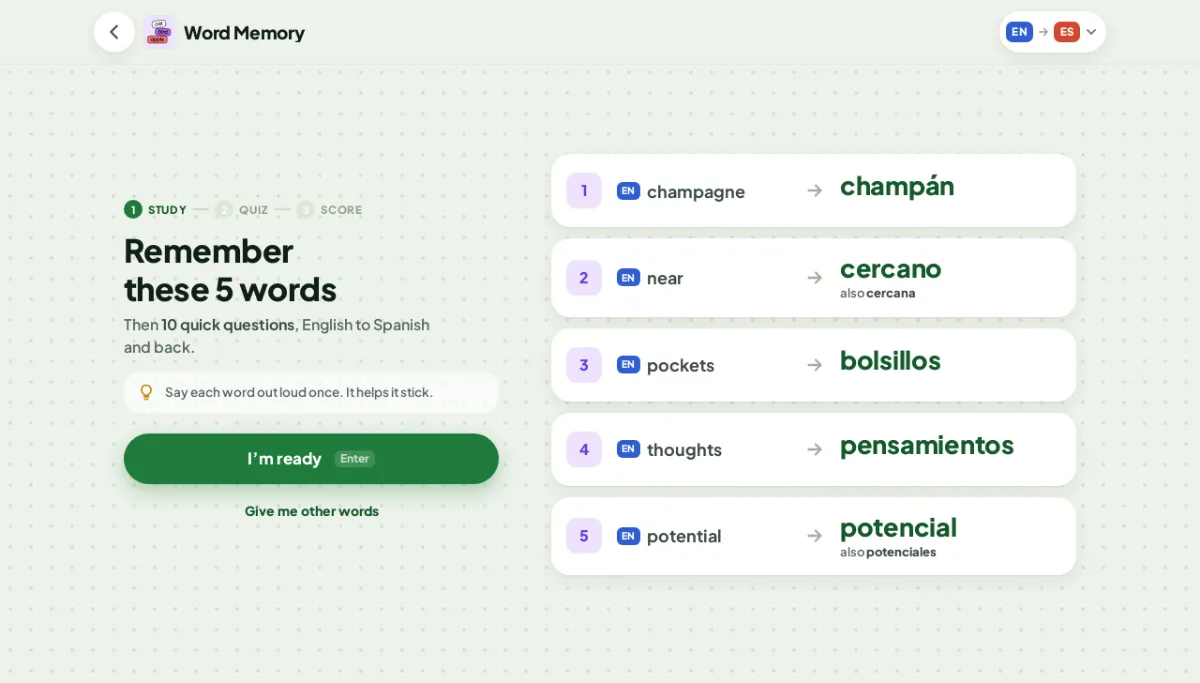
- Study the five words on screen together with their translations.
- Press I'm ready when you think you know them.
- Answer ten questions: for each word, pick the right translation from four options.
- Expect questions in both directions, from your language to the new one and back again.
- See your score, with correct answers and mistakes, then press Play again for five new words.
Also known as
- vocabulary quiz
What it exercises
The game uses a simple study-then-recall rhythm: a short look at new words, then a test straight away.
Vocabulary building
Each round helps you learn words in the language you chose, five at a time from a large word list, so you keep meeting new ones.
Active recall
Instead of reading a list again, you answer questions about it, which asks you to pull each word back out of memory.
Focus
Five words in a short study phase reward full attention, since the questions start as soon as you are ready.
Tips
- Say each word out loud once while you study. Hearing it helps it stick.
- Link a new word to an image or to a similar word you already know.
- Take your time in the study phase; the questions only begin when you press I'm ready.
- For a harder round, switch on Mix three languages, so each question asks for a different language.
- Play a few short rounds a day instead of one long session; a language learning game works best in small, regular doses.
- If a translation looks wrong, use Report a wrong translation so it can be checked.
Frequently asked questions
Is there a free vocabulary game online?
Yes. Word Memory is free, has no ads and runs in the browser on a phone, tablet or computer. There is nothing to install.
Which languages can I learn with this vocabulary game?
English, Spanish, German and French. You pick the language you speak and the one you want to learn from these four, in any combination, so it works as a Spanish vocabulary trainer as well as for the other three.
Is the game itself available in my language?
Not yet. The buttons and instructions are in English for now, while the words you learn can be in English, Spanish, German or French.
How does a round of the vocabulary game work?
You first study five words with their translations. Then come ten multiple-choice questions with four answers each, and finally your score.
Can I learn foreign words in more than one language at once?
Yes. Switch on Mix three languages: you study each word with its translations in the other three languages, and each question asks for one of them.
Does it remember my languages?
Yes. Your choice of languages is saved on your device, so the next round starts with the same pair.

